
An invoice arrives by email. Accounting data needs context.
Receiving a PDF is only the beginning. Processing requires identifying the supplier and customer, extracting amounts and dates, and adding information often absent from the document: a standardised title, cost centre or budget allocation.
For PPF, we delivered automated incoming invoice processing that combines document extraction with historical accounting relationships. The solution builds on existing invoice intake and prepares structured output for the internal LiveFlow system and the subsequent approval process.
How the solution fits together
Azure Logic Apps monitors the mailbox, stores attachments and sends a request to Azure Service Bus. Invoice Processor reads the document, resolves related information and stores an XML result in Azure Blob Storage. The queue separates email arrival from processing and supports retries after transient errors.
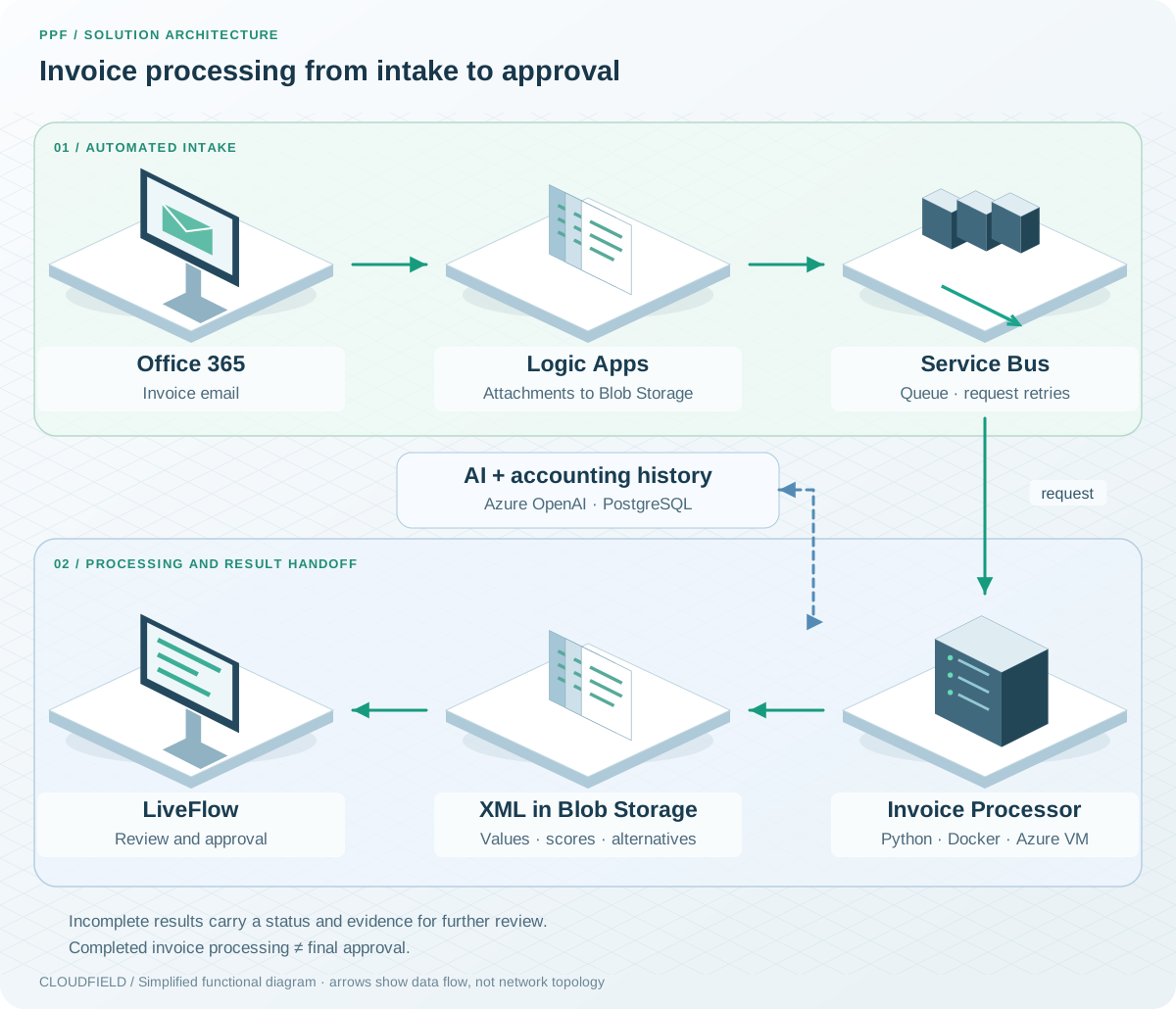
A simplified invoice flow based on the supplied documentation. Output for LiveFlow is written to storage; final approval belongs to the downstream process.
Select the attachment and extract its contents
One email may contain an invoice, a purchase order and other attachments. The processor first selects the document. A PDF containing embedded ISDOC takes priority; other attachments are evaluated using filename rules and a language model.
Structured ISDOC is read by a parser. For PDFs, an AI agent extracts the required information from images of the first three pages. Both paths produce a common data model. If no invoice is found, processing returns an explicit status.
Connect the document to accounting history
The next step identifies the supplier and customer. The system searches by company registration number, then tax identifier and name. When there is no unambiguous match, it uses similarity search in the knowledge base and language-model evaluation of candidates.
The history of the relationship also supports accounting enrichment. One agent proposes an invoice title from its contents; another aligns it with previously used naming conventions. Similar historical invoices provide evidence for a cost centre, project or budget code.
A recurring service from a known supplier, for example, may follow the same accounting allocation as previous invoices. Where history suggests several possibilities, the output retains alternatives for review.
Uncertainty is part of the result
Alongside values, the processor supplies available confidence scores and alternatives. For accounting dimensions, a score reflects frequency in historical data: a value appearing in seven of ten relevant cases receives a score of 70. This is a review aid, rather than a measured probability of correctness.
The output distinguishes three statuses:
- FullyProcessed: all processing steps completed.
- PartiallyProcessed: information is missing, such as an unambiguous business partner or enough history for accounting allocation.
- InvoiceNotFound: no invoice was identified among the attachments.
Completed processing means that data is prepared. Final approval remains in the downstream workflow.
Trace an individual invoice through processing
Invoice Processor is a Python application running in a Docker container on an Azure virtual machine. Service Bus queues requests, while results remain linked to the original document. A request identifier makes it possible to trace a particular invoice in Application Insights.
Technologies and our role
| Area | Technologies | What we deliver |
|---|---|---|
| Invoice intake | Office 365, Azure Logic Apps | Email and attachment handling |
| Request management | Azure Service Bus, Blob Storage | Queuing, document handoff and result storage |
| Extraction and interpretation | Python, Docker, Azure OpenAI | Invoice reading, entity resolution and enrichment |
| Context and integration | PostgreSQL, vector search, XML | Historical context and output for LiveFlow |
| Monitoring | Application Insights, Azure Monitor | Processing traceability and operational diagnostics |
What the partnership delivers
PPF gained a production foundation for automation from email intake to structured accounting data. Manual work can focus on review, exceptions and approval. The solution connects invoice contents to accounting history and supplies the information needed to assess its output.