

From robot motion to finished product images
PhotoRobot develops robotic systems for product photography: turntables, robotic arms and other equipment for capturing 2D images, 360° presentations and source images for 3D. In a photography studio, robot motion is only one part of the job. Operators need to coordinate equipment with the camera, process the captured images and repeat the workflow for the next product. The manufacturer also needs visibility into the robots it has delivered and their configuration.
For PhotoRobot, we develop software across three connected areas: control unit firmware, the Controls application for photographers and Access Server for device management. The partnership spans the software inside the robot, everyday studio work and the manufacturer’s operational systems.
How the solution fits together
Controls is the photographer’s workspace. Firmware in the control unit provides the software layer for operating the robot. Access Server complements the system with central device records, parameters and activations.
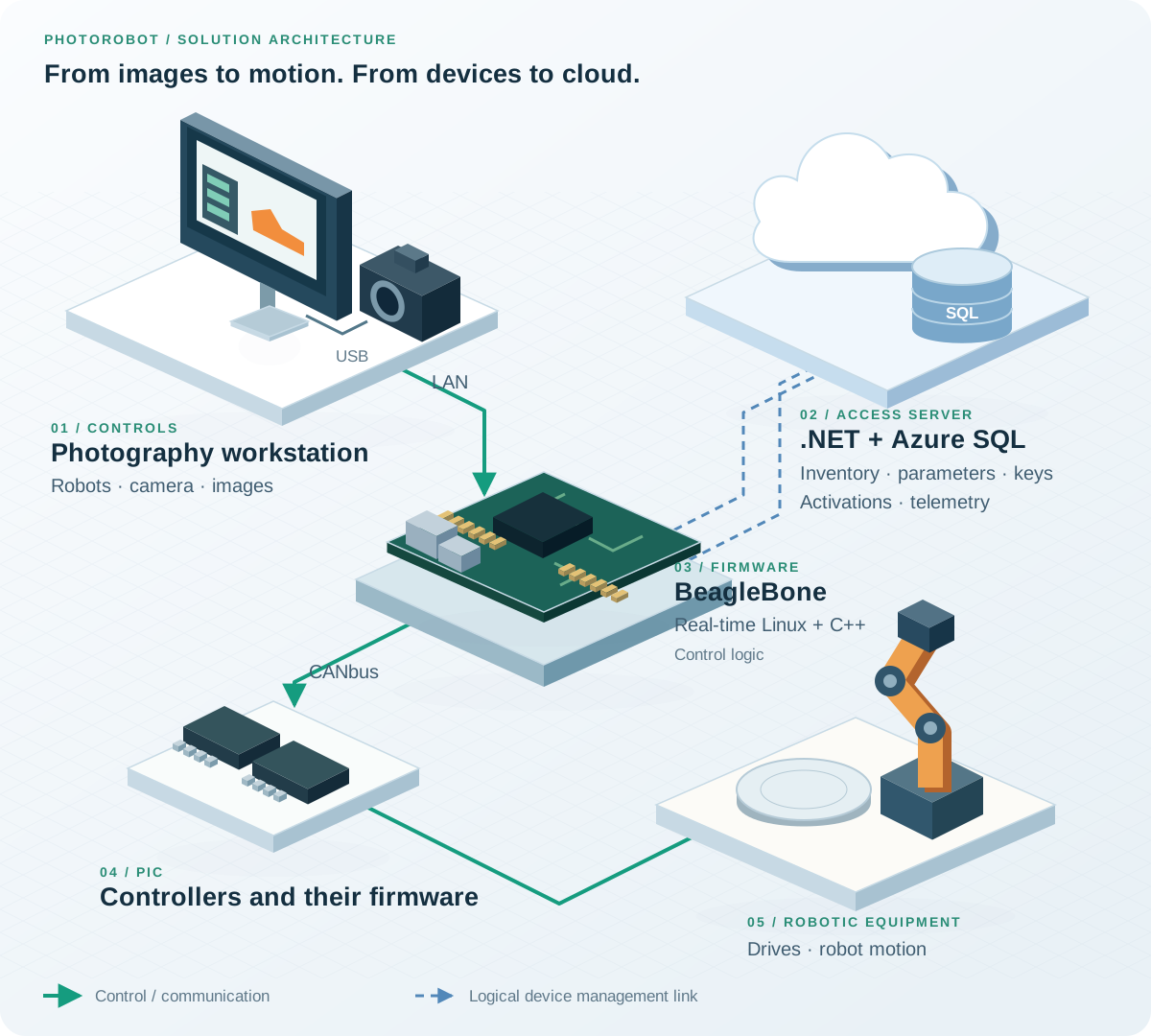
The control path from Controls through BeagleBone and PIC controllers to the robot. Dashed arrows represent logical Access Server links for parameters, activations and telemetry; they do not specify a network interface.
Firmware: software inside the control unit
The control unit connects control requests to the robot’s electronics. We develop firmware built on BeagleBone, a customised real-time Linux environment and the PhotoRobot C++ application. The control system also includes PIC microcontrollers and CANbus communication.
This involves more than loading a single application onto a device. The operating environment, control logic and communication with controllers all need to work together. Real-time Linux provides the environment for the control application; C++ implements its logic, while CANbus connects parts of the control electronics with PIC controllers.
A practical use case is operating a robotic workstation during a product shoot. A software command needs the corresponding response from the device so that robot motion fits into the photography sequence. Development therefore requires an understanding of both the application and the hardware it runs on.
Controls: from workstation setup to image editing
In PhotoRobot Controls, we contribute to the software photographers use to operate robots, work with cameras and edit images. For the user, these technical components come together as a single photography workflow.
A typical session starts by selecting the workspace and its equipment. The photographer configures a capture sequence, takes the images and proceeds to processing. Controls provides a single interface for robots, cameras and lights, with live view and reusable presets. Editing tools include cropping, centring and background removal. PhotoRobot Controls feature overview.
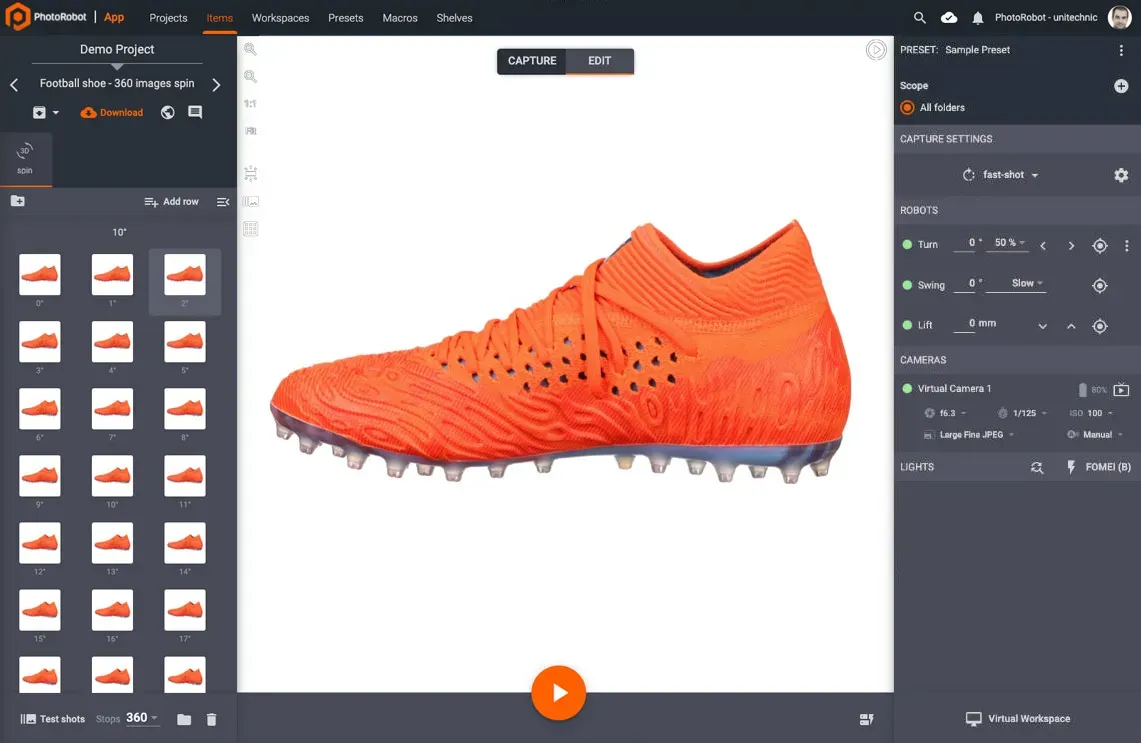
Controls working on a 360° product presentation: capture angles on the left, a preview in the centre and robot, camera and lighting controls on the right. This example uses a virtual workspace. Source: PhotoRobot.

Editing the whole sequence in one workspace
After capture, the photographer switches to Edit mode. Cropping sets the aspect ratio and space around the product, centring aligns its position, and background adjustments prepare the final appearance. Consistent processing across the image set matters for a 360° presentation: the product should stay aligned as the viewer rotates it.
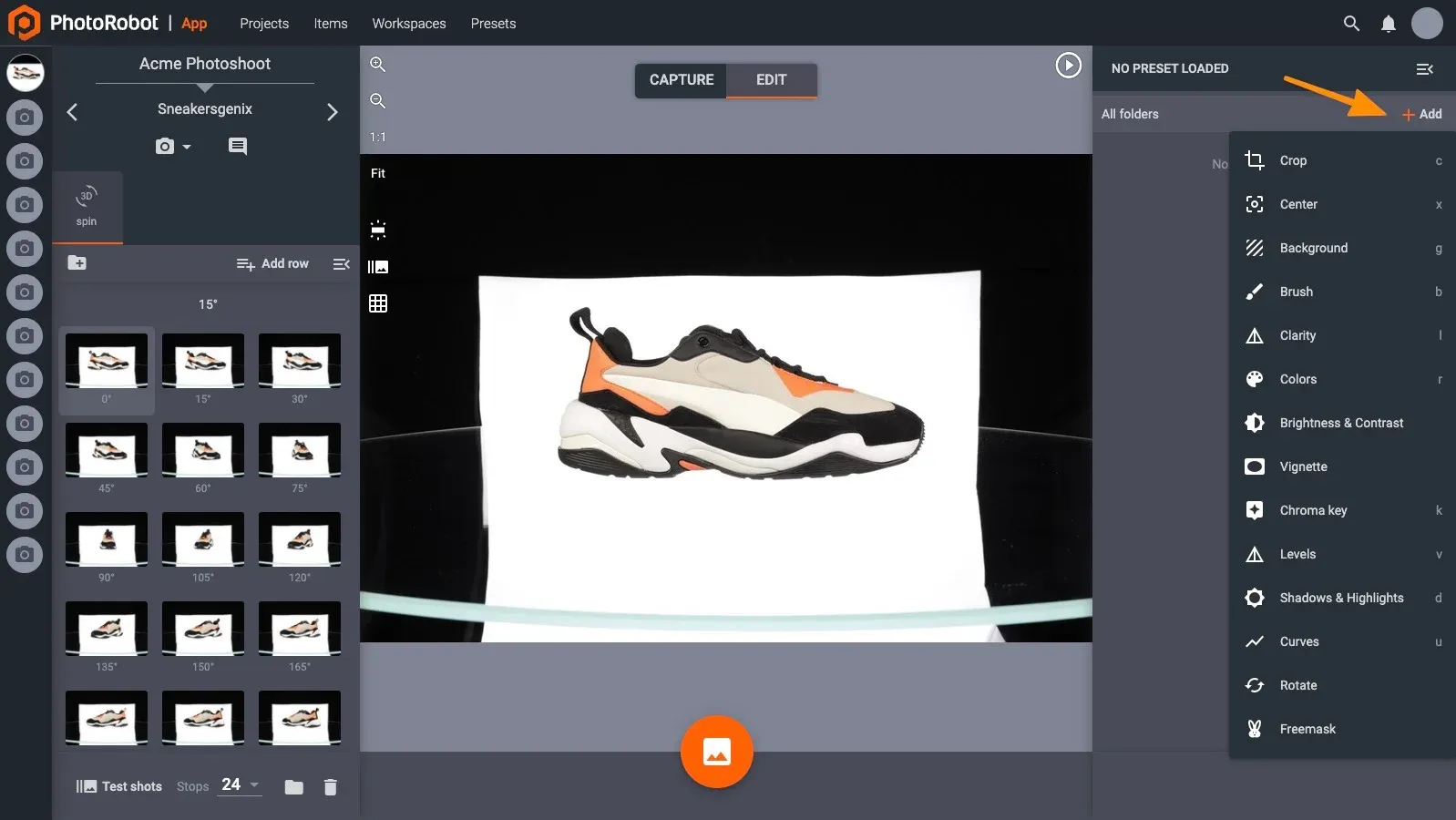
Edit mode with image operations and a product sequence captured from multiple angles. Source: PhotoRobot – Getting Started.
When photographing a series of similar products, for example, the operator can reuse prepared capture and processing settings. They do not have to configure every step from scratch for each item. This connection between equipment control and image processing is why our work spans both the photography application and the firmware.
Access Server: visibility into robots and their operation
PhotoRobot Access Server is a device management web application built on .NET and Azure SQL. It provides the operational back office for robot and control unit records, parameter distribution, telemetry and key management, including activation keys.
While a photographer works on a specific product in the studio, the manufacturer needs to manage the installed device base. Access Server brings the information needed for that work together:
- Robot and control unit inventory: device identification and visibility into hardware generations and firmware versions.
- Parameter distribution: management of robot parameters and their distribution to the relevant devices.
- Telemetry: operational information to support monitoring and technical assistance.
- Keys and activations: management of keys, activation keys and device activation status.
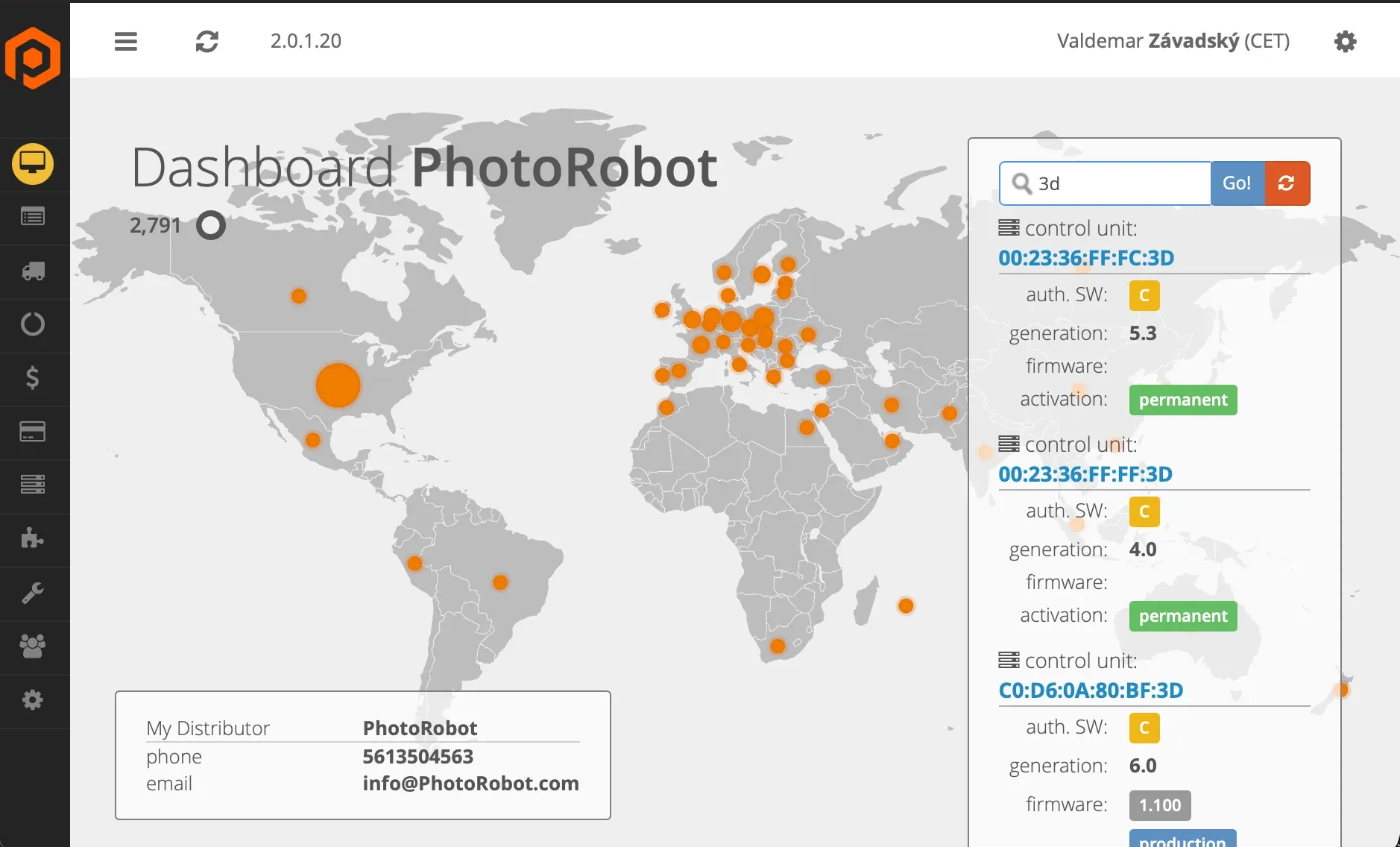
An Access Server screen from the project. Beside the map, control unit results show identifiers, generations and activation status; one also shows a firmware version. This is a snapshot of the application, not a current count of deployed robots.
When working on a particular device, the team can use its identity, configuration and available operational data as a starting point. Managing robots, parameters and activations is a distinct part of the product that needs attention alongside the operation of the machine itself.
Technologies and our role
| Area | Technologies | What we develop |
|---|---|---|
| Control unit | BeagleBone, customised real-time Linux, C++ | Firmware and the PhotoRobot control application |
| Control electronics | PIC microcontrollers, CANbus | Controller firmware and communication within the control system |
| Photography workstation | PhotoRobot Controls, robot and camera integration | Equipment control, image capture and editing |
| Device management | .NET, Azure SQL | Access Server: inventory, parameters, telemetry, keys and activations |
What the partnership delivers
PhotoRobot has a development partner who understands the connections between control electronics, the photography application and central device management. We can address changes in the context of the whole product: from robot behaviour and the photographer’s workflow to the information used by the operations team.
The partnership delivers continuously developed software for three distinct needs: operating robots, processing product images and managing deployed devices.
“Cloudfield is an essential partner for us, providing a comprehensive solution for our robotic systems and helping us develop individual components: software, firmware and cloud infrastructure. Thanks to them, we can offer innovative and efficient photography services.”
— Kamil Hrbáček, CEO, PhotoRobot